on a mission:
Making medical education easier to explore in 3D
The existing app works, but leaves first-time users wandering through confusing paths and dated screens. As we dig into the experience, we uncover a bigger challenge: how do you turn complex medical information into something people can intuitively navigate, especially when the same experience has to work on a touchscreen and inside a VR headset?
00 Overview
Modernising a Legacy Medical Education App
Problem
The existing application aimed to educate the public about a chronic disorder, but outdated visuals and unclear navigation made the experience difficult to explore independently.
Outcome
Revised user flow, wireframes, two visual-direction proposals, approved design system, forward-looking component set.
Info
Project type: UX/UI for a public-facing exhibit for conferences and trade fairs
Medium: Large-format touchscreen, VR/XR headset
Role: UX/UI Designer
Team: 6
Disclaimer
Client details are anonymised under NDA.All visuals referenced are recreated or redacted to protect proprietary brand assets.
01 problem
Can Users Find Their Way in 3D?
The company came to us with an existing application that needed a visual and structural overhaul. It had been built to inform the public — at conferences and trade fairs — about a chronic bleeding disorder.
The project focus:
streamline user journey
- The original navigation contained multiple redundant paths leading to the same content, so users repeated the same information without realising it.
- The flow didn't follow a chronological, cause-and-effect logic, which left first-time users misclicking and losing their place with no clear way back.
complete redesign of ui
- The existing visual design looked dated and lacked the credibility needed to present a scientific, medical topic to the public.
- The corporate identity had been built for flat, bright, right-angled 2D layouts, which broke down visually once the interface became spatial and translucent in VR/XR.
02 Solution
Turning a 3D Maze into a Guided Journey
A Maze, Dead Ends, and One Very Confused User
Before I joined, a preliminary survey of over 30 mostly open-ended questions had been created. I began by refining it by analysing each question to ensure clarity, relevance, and measurable value.
My focus was on making questions more direct, reducing bias, and selecting appropriate response types to enable meaningful comparison and reliable analysis of user feedback.
mapped
every existing screen and transition to identify duplicate content and orphaned states
resturctured
the journey into a chronological, cause-and-effect sequence
consolidated
navigation branches that added no new information, and redesigned the specific controls where users had been misclicking
What Actually Goes on This Screen?
I built full wireframes around the new flow and used them as a scoping tool, since the medical content itself had to come from the client's specialists.It was also my debut designing 3D spatial interfaces. I had to understand the developers’ constraints better and research best practices in 3D UX/UI design.
1
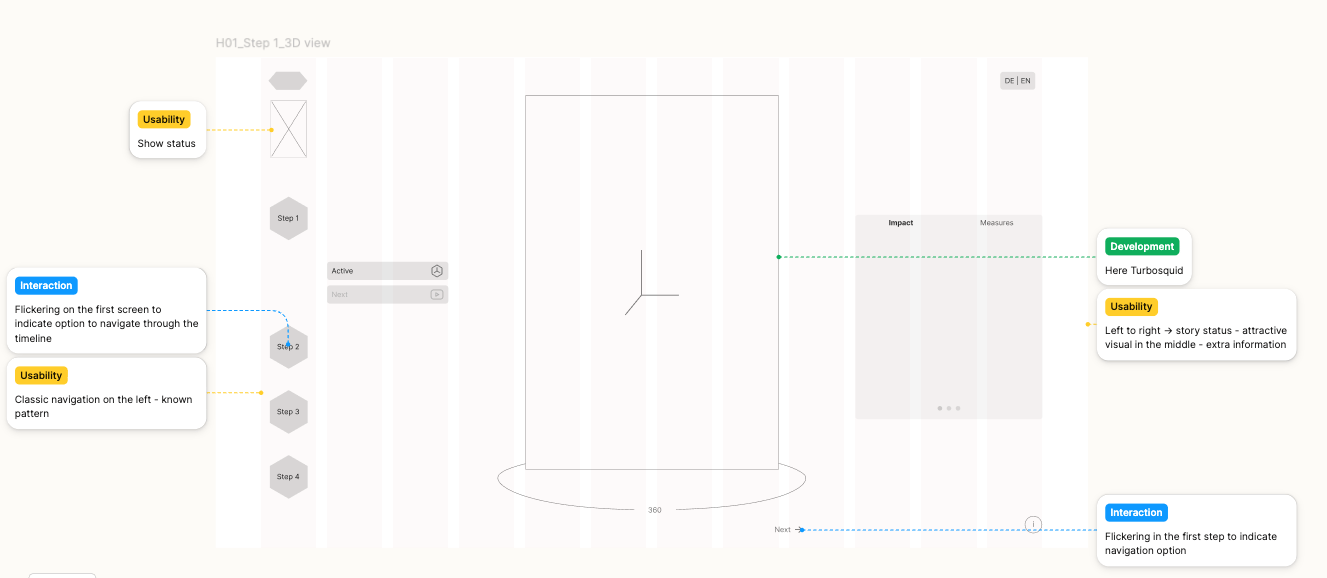
Wireframed every screen for portrait and landscape mode, annotated with the exact content required at each step.
2
Used the wireframes to request and validate medical content directly from the client's team and discuss with 3D artists and developers the best solution for adapting onto different media (touchscreen vs. VR-headset).
01
Sample wireframe with annotations for team members
We Had a Vision. Then the Brand Guidelines Arrived
Working with developers and 3D artists, I proposed a modern, slightly futuristic, scientific look built on semi-translucent elements, which was approved and used for a first full design iteration.
The main challenge arrived after that approval: the feedback was slow and at one point reversed, and I was told the design now needed to align closely with the corporate identity — a system built for flat 2D layouts, not translucent VR/XR — while also becoming warmer and friendlier, in tension with the more clinical look already agreed.
02
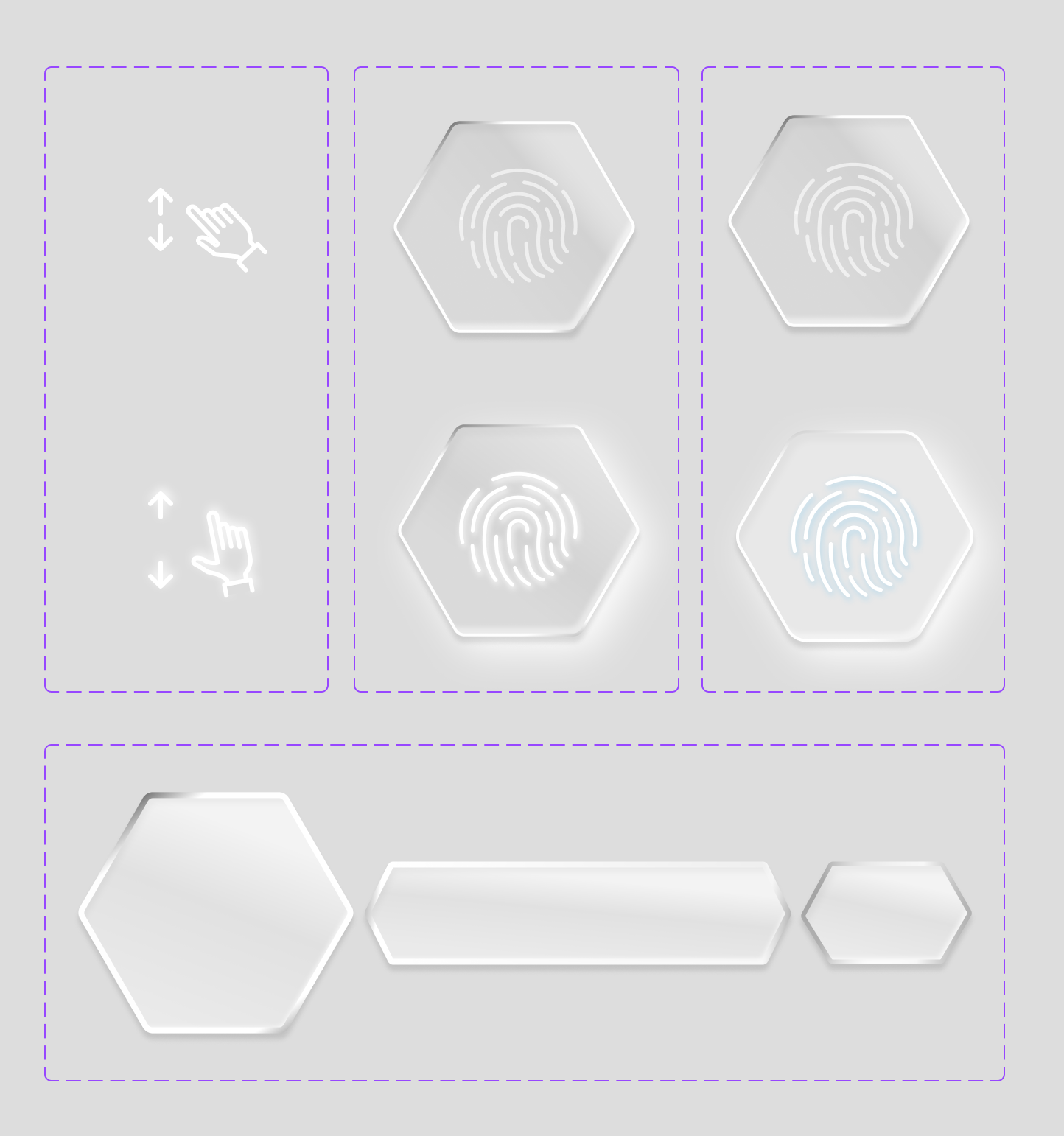
Sample button components
03
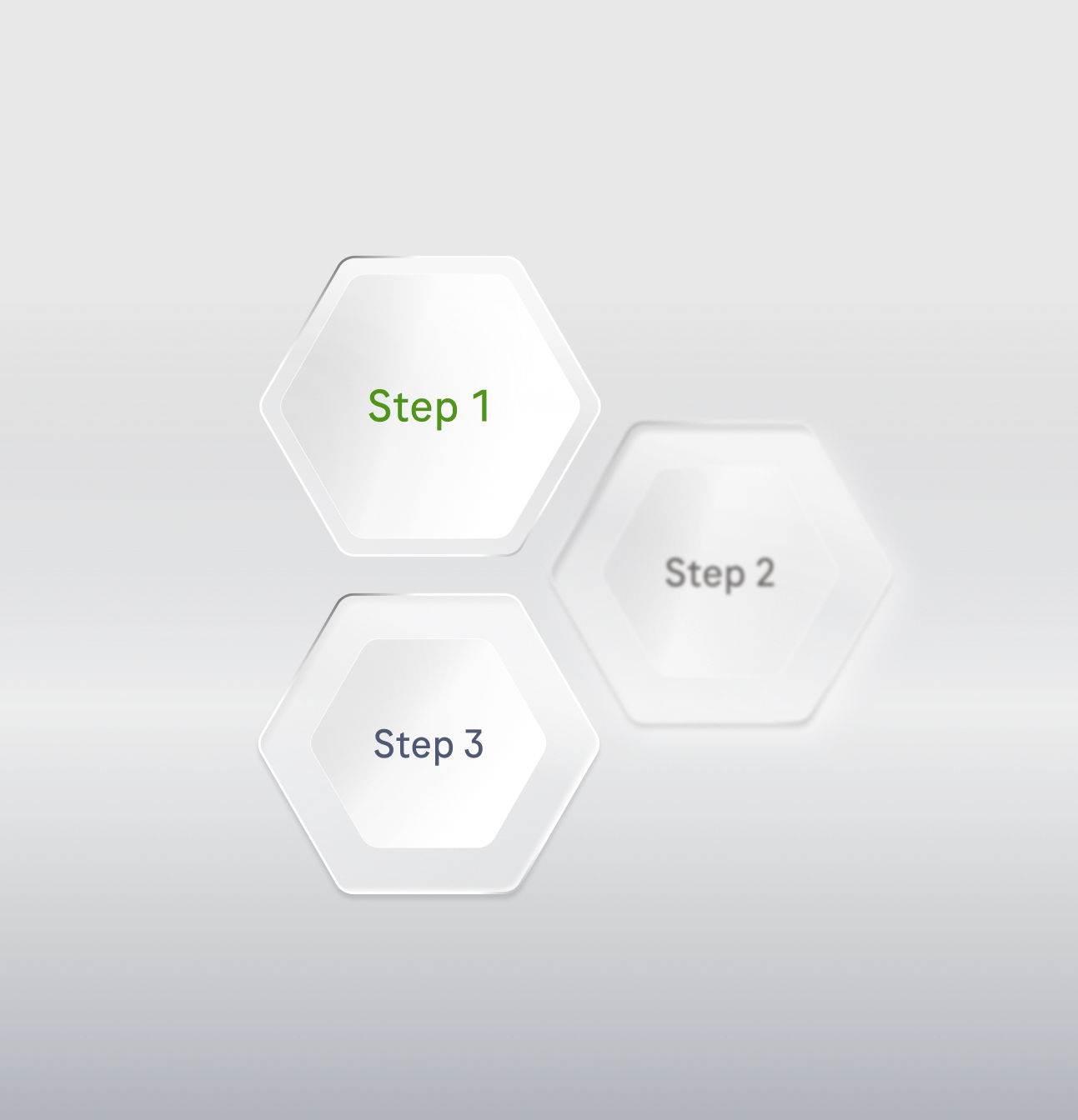
Sample buttons states
CORE ISSUES WITH EXISTING CORPORATE IDENTITY
COLOURS
The primary content already carries the base neutral tones.
BASE COLOURS
Bright, flat backgrounds are unsuitable for prolonged VR use.
GRADIENTS
Gradients and subdued neutrals are preferable to large uniform surfaces.
TRANSPARENCY
See-through or translucent elements’ role in the corporate identity is not yet clearly defined.
HOW I PIVOTED:
- Developed two distinct visual directions, both grounded in the corporate identity's colours and shapes.
- Presented both with trade-offs made explicit, giving the client a concrete basis for a final decision.
03 Results
Beyond This One App: Building a Case for Brand in 3D
A refined direction combining elements of both proposals was approved and handed to developers for implementation, replacing a confusing, dated experience with a chronological, low-friction flow suited to unsupervised use at a trade-fair booth.
Key deliveries:

Make It Flow
A fully restructured user journey, wireframes, and an approved, implemented visual identity reconciling the client's brand with the constraints of a translucent, spatial medium.
Build for Tomorrow
A forward-looking component direction, reusing elements already proven to work in 3D/VR and consistent with the corporate identity, for future projects with the same client.
Future-Proof the Brand
A concrete, evidence-based case with the client for extending their corporate identity to explicitly cover 3D and VR use cases, rather than reinterpreting it from scratch on every new immersive project.


Designing for 3D means questioning assumptions that work perfectly well in 2D. A navigation pattern that feels obvious on a touchscreen can become confusing once users have to orient themselves in space.
Good design sometimes means negotiating constraints rather than choosing the “perfect” direction. When the corporate identity and the requirements of VR pulled in different directions, presenting clear alternatives and their trade-offs helped turn subjective feedback into a concrete design decision.
Joint journey complete!
Curious what else I’ve been working on?


on a mission:
Making medical education easier to explore in 3D
The existing app works, but leaves first-time users wandering through confusing paths and dated screens. As we dig into the experience, we uncover a bigger challenge: how do you turn complex medical information into something people can intuitively navigate, especially when the same experience has to work on a touchscreen and inside a VR headset?
00
Overview
Modernising a Legacy Medical Education App
Problem
The existing application aimed to educate the public about a chronic disorder, but outdated visuals and unclear navigation made the experience difficult to explore independently.
Outcome
Revised user flow, wireframes, two visual-direction proposals, approved design system, forward-looking component set.
Info
Project type: UX/UI for a public-facing exhibit for conferences and trade fairs
Medium: Large-format touchscreen, VR/XR headset
Role: UX/UI Designer
Team: 6
Disclaimer
Client details are anonymised under NDA.All visuals referenced are recreated or redacted to protect proprietary brand assets.
01
problem
Can Users Find Their Way in 3D?
The company came to us with an existing application that needed a visual and structural overhaul. It had been built to inform the public — at conferences and trade fairs — about a chronic bleeding disorder.
The project focus:
streamline user journey
- The original navigation contained multiple redundant paths leading to the same content, so users repeated the same information without realising it.
- The flow didn't follow a chronological, cause-and-effect logic, which left first-time users misclicking and losing their place with no clear way back.
complete redesign of ui
- The existing visual design looked dated and lacked the credibility needed to present a scientific, medical topic to the public.
- The corporate identity had been built for flat, bright, right-angled 2D layouts, which broke down visually once the interface became spatial and translucent in VR/XR.
02
Solution
Turning a 3D Maze into a Guided Journey
A Maze, Dead Ends, and One Very Confused User
Before I joined, a preliminary survey of over 30 mostly open-ended questions had been created. I began by refining it by analysing each question to ensure clarity, relevance, and measurable value.
My focus was on making questions more direct, reducing bias, and selecting appropriate response types to enable meaningful comparison and reliable analysis of user feedback.
mapped
every existing screen and transition to identify duplicate content and orphaned states
resturctured
the journey into a chronological, cause-and-effect sequence
consolidated
navigation branches that added no new information, and redesigned the specific controls where users had been misclicking
What Actually Goes on This Screen?
I built full wireframes around the new flow and used them as a scoping tool, since the medical content itself had to come from the client's specialists.It was also my debut designing 3D spatial interfaces. I had to understand the developers’ constraints better and research best practices in 3D UX/UI design.
1
Wireframed every screen for portrait and landscape mode, annotated with the exact content required at each step.
2
Used the wireframes to request and validate medical content directly from the client's team and discuss with 3D artists and developers the best solution for adapting onto different media (touchscreen vs. VR-headset).
01
Sample wireframe with annotations for team members
We Had a Vision. Then the Brand Guidelines Arrived
Working with developers and 3D artists, I proposed a modern, slightly futuristic, scientific look built on semi-translucent elements, which was approved and used for a first full design iteration.
The main challenge arrived after that approval: the feedback was slow and at one point reversed, and I was told the design now needed to align closely with the corporate identity — a system built for flat 2D layouts, not translucent VR/XR — while also becoming warmer and friendlier, in tension with the more clinical look already agreed.
02
Sample button components
03
Sample buttons states
CORE ISSUES WITH EXISTING CORPORATE IDENTITY
COLOURS
The primary content already carries the base neutral tones.
BASE COLOURS
Bright, flat backgrounds are unsuitable for prolonged VR use.
GRADIENTS
Gradients and subdued neutrals are preferable to large uniform surfaces.
TRANSPARENCY
See-through or translucent elements’ role in the corporate identity is not yet clearly defined.
HOW I PIVOTED:
- Developed two distinct visual directions, both grounded in the corporate identity's colours and shapes.
- Presented both with trade-offs made explicit, giving the client a concrete basis for a final decision.
03
Results
Beyond This One App: Building a Case for Brand in 3D
A refined direction combining elements of both proposals was approved and handed to developers for implementation, replacing a confusing, dated experience with a chronological, low-friction flow suited to unsupervised use at a trade-fair booth.
Key deliveries:
Make It Flow
A fully restructured user journey, wireframes, and an approved, implemented visual identity reconciling the client's brand with the constraints of a translucent, spatial medium.
Future-Proof the Brand
A concrete, evidence-based case with the client for extending their corporate identity to explicitly cover 3D and VR use cases, rather than reinterpreting it from scratch on every new immersive project.
Build for Tomorrow
A forward-looking component direction, reusing elements already proven to work in 3D/VR and consistent with the corporate identity, for future projects with the same client.


Designing for 3D means questioning assumptions that work perfectly well in 2D. A navigation pattern that feels obvious on a touchscreen can become confusing once users have to orient themselves in space.
Good design sometimes means negotiating constraints rather than choosing the “perfect” direction. When the corporate identity and the requirements of VR pulled in different directions, presenting clear alternatives and their trade-offs helped turn subjective feedback into a concrete design decision.
Joint journey complete!
Curious what else I’ve been working on?

on a mission:
Making medical education easier to explore in 3D
The existing app works, but leaves first-time users wandering through confusing paths and dated screens. As we dig into the experience, we uncover a bigger challenge: how do you turn complex medical information into something people can intuitively navigate, especially when the same experience has to work on a touchscreen and inside a VR headset?
00
Overview
Modernising a Legacy Medical Education App
Problem
The existing application aimed to educate the public about a chronic disorder, but outdated visuals and unclear navigation made the experience difficult to explore independently.
Outcome
Revised user flow, wireframes, two visual-direction proposals, approved design system, forward-looking component set.
Info
Project type: UX/UI for a public-facing exhibit for conferences and trade fairs
Medium: Large-format touchscreen, VR/XR headset
Role: UX/UI Designer
Team: 6
Disclaimer
Client details are anonymised under NDA.All visuals referenced are recreated or redacted to protect proprietary brand assets.
01
problem
Can Users Find Their Way in 3D?
The company came to us with an existing application that needed a visual and structural overhaul. It had been built to inform the public — at conferences and trade fairs — about a chronic bleeding disorder.
The project focus:
streamline user journey
- The original navigation contained multiple redundant paths leading to the same content, so users repeated the same information without realising it.
- The flow didn't follow a chronological, cause-and-effect logic, which left first-time users misclicking and losing their place with no clear way back.
complete redesign of ui
- The existing visual design looked dated and lacked the credibility needed to present a scientific, medical topic to the public.
- The corporate identity had been built for flat, bright, right-angled 2D layouts, which broke down visually once the interface became spatial and translucent in VR/XR.
02
Solution
Turning a 3D Maze into a Guided Journey
A Maze, Dead Ends, and One Very Confused User
Before any visual work began, I audited the existing flow end to end and found multiple redundant paths reaching the same content, dead ends with no way back, and a structure that didn't match the chronological way someone would actually want to learn about the condition.
mapped
every existing screen and transition to identify duplicate content and orphaned states
resturctured
the journey into a chronological, cause-and-effect sequence
consolidated
navigation branches that added no new information, and redesigned the specific controls where users had been misclicking
What Actually Goes on This Screen?
I built full wireframes around the new flow and used them as a scoping tool, since the medical content itself had to come from the client's specialists.It was also my debut designing 3D spatial interfaces. I had to understand the developers’ constraints better and research best practices in 3D UX/UI design.
1
Wireframed every screen for portrait and landscape mode, annotated with the exact content required at each step.
2
Used the wireframes to request and validate medical content directly from the client's team and discuss with 3D artists and developers the best solution for adapting onto different media (touchscreen vs. VR-headset).
01
Sample wireframe with annotations for team members
We Had a Vision. Then the Brand Guidelines Arrived
Working with developers and 3D artists, I proposed a modern, slightly futuristic, scientific look built on semi-translucent elements, which was approved and used for a first full design iteration.
The main challenge arrived after that approval: the feedback was slow and at one point reversed, and I was told the design now needed to align closely with the corporate identity — a system built for flat 2D layouts, not translucent VR/XR — while also becoming warmer and friendlier, in tension with the more clinical look already agreed.
02
Sample button components
03
Sample buttons states
CORE ISSUES WITH EXISTING CORPORATE IDENTITY
COLOURS
The primary content already carries the base neutral tones.
BASE COLOURS
Bright, flat backgrounds are unsuitable for prolonged VR use.
GRADIENTS
Gradients and subdued neutrals are preferable to large uniform surfaces.
TRANSPARENCY
See-through or translucent elements’ role in the corporate identity is not yet clearly defined.
HOW I PIVOTED:
- Developed two distinct visual directions, both grounded in the corporate identity's colours and shapes.
- Presented both with trade-offs made explicit, giving the client a concrete basis for a final decision.
03
Results
Beyond This One App: Building a Case for Brand in 3D
A refined direction combining elements of both proposals was approved and handed to developers for implementation, replacing a confusing, dated experience with a chronological, low-friction flow suited to unsupervised use at a trade-fair booth.
Key deliveries:
Make It Flow
A fully restructured user journey, wireframes, and an approved, implemented visual identity reconciling the client's brand with the constraints of a translucent, spatial medium.
Build for Tomorrow
A forward-looking component direction, reusing elements already proven to work in 3D/VR and consistent with the corporate identity, for future projects with the same client.
Future-Proof the Brand
A concrete, evidence-based case with the client for extending their corporate identity to explicitly cover 3D and VR use cases, rather than reinterpreting it from scratch on every new immersive project.

Designing for 3D means questioning assumptions that work perfectly well in 2D. A navigation pattern that feels obvious on a touchscreen can become confusing once users have to orient themselves in space.
Good design sometimes means negotiating constraints rather than choosing the “perfect” direction. When the corporate identity and the requirements of VR pulled in different directions, presenting clear alternatives and their trade-offs helped turn subjective feedback into a concrete design decision.
Joint journey complete!
Curious what else I’ve been working on?

Process:
on a mission:
Making medical education easier to explore in 3D
The existing app works, but leaves first-time users wandering through confusing paths and dated screens. As we dig into the experience, we uncover a bigger challenge: how do you turn complex medical information into something people can intuitively navigate, especially when the same experience has to work on a touchscreen and inside a VR headset?
00
Overview
Modernising a Legacy Medical Education App
Problem
The existing application aimed to educate the public about a chronic disorder, but outdated visuals and unclear navigation made the experience difficult to explore independently.
Outcome
Revised user flow, wireframes, two visual-direction proposals, approved design system, forward-looking component set.
Info
Project type: UX/UI for a public-facing exhibit for conferences and trade fairs
Medium: Large-format touchscreen, VR/XR headset
Role: UX/UI Designer
Team: 6
Disclaimer
Client details are anonymised under NDA.All visuals referenced are recreated or redacted to protect proprietary brand assets.
01
problem
Can Users Find Their Way in 3D?
The company came to us with an existing application that needed a visual and structural overhaul. It had been built to inform the public — at conferences and trade fairs — about a chronic bleeding disorder.
The project focus:
streamline user journey
- The original navigation contained multiple redundant paths leading to the same content, so users repeated the same information without realising it.
- The flow didn't follow a chronological, cause-and-effect logic, which left first-time users misclicking and losing their place with no clear way back.
complete redesign of ui
- The existing visual design looked dated and lacked the credibility needed to present a scientific, medical topic to the public.
- The corporate identity had been built for flat, bright, right-angled 2D layouts, which broke down visually once the interface became spatial and translucent in VR/XR.
02
Solution
Turning a 3D Maze into a Guided Journey
A Maze, Dead Ends, and One Very Confused User
Before any visual work began, I audited the existing flow end to end and found multiple redundant paths reaching the same content, dead ends with no way back, and a structure that didn't match the chronological way someone would actually want to learn about the condition.
mapped
every existing screen and transition to identify duplicate content and orphaned states
resturctured
the journey into a chronological, cause-and-effect sequence
consolidated
navigation branches that added no new information, and redesigned the specific controls where users had been misclicking
What Actually Goes on This Screen?
I built full wireframes around the new flow and used them as a scoping tool, since the medical content itself had to come from the client's specialists.It was also my debut designing 3D spatial interfaces. I had to understand the developers’ constraints better and research best practices in 3D UX/UI design.
1
Wireframed every screen for portrait and landscape mode, annotated with the exact content required at each step.
2
Used the wireframes to request and validate medical content directly from the client's team and discuss with 3D artists and developers the best solution for adapting onto different media (touchscreen vs. VR-headset).
01
Sample wireframe with annotations for team members
We Had a Vision. Then the Brand Guidelines Arrived
Working with developers and 3D artists, I proposed a modern, slightly futuristic, scientific look built on semi-translucent elements, which was approved and used for a first full design iteration.
The main challenge arrived after that approval: the feedback was slow and at one point reversed, and I was told the design now needed to align closely with the corporate identity — a system built for flat 2D layouts, not translucent VR/XR — while also becoming warmer and friendlier, in tension with the more clinical look already agreed.
02
Sample button components
03
Sample buttons states
CORE ISSUES WITH EXISTING CORPORATE IDENTITY
COLOURS
The primary content already carries the base neutral tones.
BASE COLOURS
Bright, flat backgrounds are unsuitable for prolonged VR use.
GRADIENTS
Gradients and subdued neutrals are preferable to large uniform surfaces.
TRANSPARENCY
See-through or translucent elements’ role in the corporate identity is not yet clearly defined.
HOW I PIVOTED:
- Developed two distinct visual directions, both grounded in the corporate identity's colours and shapes.
- Presented both with trade-offs made explicit, giving the client a concrete basis for a final decision.
03
Results
Beyond This One App: Building a Case for Brand in 3D
A refined direction combining elements of both proposals was approved and handed to developers for implementation, replacing a confusing, dated experience with a chronological, low-friction flow suited to unsupervised use at a trade-fair booth.
Key deliveries:
Make It Flow
A fully restructured user journey, wireframes, and an approved, implemented visual identity reconciling the client's brand with the constraints of a translucent, spatial medium.
Build for Tomorrow
A forward-looking component direction, reusing elements already proven to work in 3D/VR and consistent with the corporate identity, for future projects with the same client.
Future-Proof the Brand
A concrete, evidence-based case with the client for extending their corporate identity to explicitly cover 3D and VR use cases, rather than reinterpreting it from scratch on every new immersive project.
Designing for 3D means questioning assumptions that work perfectly well in 2D. A navigation pattern that feels obvious on a touchscreen can become confusing once users have to orient themselves in space.
Good design sometimes means negotiating constraints rather than choosing the “perfect” direction. When the corporate identity and the requirements of VR pulled in different directions, presenting clear alternatives and their trade-offs helped turn subjective feedback into a concrete design decision.
Joint journey complete!
Curious what else I’ve been working on?
Process: